The speculative and soon to be outdated AI consumability scorecard
9 min read
There’s a lot of confusion in the docs and AI space.
That’s due to a lot of factors, including:
- Everything is new.
- Everything is changing, and changing at damn near the speed of light (or at least the speed of smell, which is faster than you’d think).
- There’s no key incumbent setting standards (like Google for SEO or Amazon for shipping packaging).
Given that confusion — as well as the constant questions I get internally at Cloudflare and from my network — I figured I’d take a stab at defining what “AI friendly” means for docs.
Here’s an attempt, or what I’m calling the speculative and soon to be outdated AI consumability scorecard.
The reason I say speculative is because there’s really no centralized or official guidance in the space and — as such — most of the effects of individual actions are hard to evaluate.
Scorecard
Section titled “Scorecard”| Feature | Category | Weight |
|---|---|---|
robots.txt | AI crawling | 20 |
| Inaccessible preview builds | AI crawling | 25 |
llms.txt | AI crawling, Content portability | 5 |
| Markdown output | Content portability | 15 |
| Markdown via cURL | Content portability | 5 |
| ”Copy page as markdown” button | Content portability | 5 |
| MCP server | Content portability | 20 |
| MCP install links | Content portability | 5 |
Explanations
Section titled “Explanations”My scorecard breaks down functionality into two broad buckets, AI crawling and Content portability.
AI crawling
Section titled “AI crawling”The AI crawling portion of the scorecard evaluates how accessible your content is to the crawlers from major AI providers (Google, Anthropic, OpenAI, Perplexity, etc.).
By and large, there actually aren’t too many things on this list beyond general SEO optimizations. The general takeaway here is essentially, optimize for one robot, you optimize for them all.
Google explicitly says ↗ as such in its guidance for site owners:
While specific optimization isn’t required for AI Overviews and AI Mode, all existing SEO fundamentals continue to be worthwhile…
They repeat this sentiment further down the page too (in a note):
You don’t need to create new machine readable files, AI text files, or markup to appear in these features. There’s also no special schema.org structured data that you need to add.
robots.txt
Section titled “robots.txt”A robots.txt ↗ file lists a website’s preferences for bot behavior, telling bots which webpages they should and should not access.
In a docs context, you generally want your robots.txt to be a giant PLEASE SCRAPE ME sign for all robots, so it’d probably look like:
User-agent: *Content-Signal: search=yes,ai-train=yesAllow: /Sitemap: https://developers.cloudflare.com/sitemap-index.xmlThe slightly new feature here is the Content Signals ↗ directive added to your file, explicitly allowing for AI training and AI search use cases. This is a very new standard (also promoted by Cloudflare), so unclear exactly on the effects… but it doesn’t hurt to pre-emptively opt in.
Inaccessible preview builds
Section titled “Inaccessible preview builds”In the Cloudflare docs, preview builds ↗ help us review proposed changes to the docs. We create these whenever someone opens a pull request to our repo, which meant that we have hundreds if not thousands of URLs with different versions of our documentation.
What preview builds don’t help with though is AI crawling. We got a rather unpleasant surprise near the end of 2025, when someone internal flagged to us that ChatGPT was citing preview URLs instead of our production URLs.
Using Cloudflare’s AI Crawl Control ↗, we looked at the traffic to our various subdomains and were unpleasantly suprised again… we found that as much as 80% of the AI crawls were accessing our preview sites instead of our main site. This meant that AI crawlers were prone to returning inaccurate information, which may have seemed like hallucinations.
We solved this problem by adding a custom Worker ↗ that covered the routes used by our preview URLs (*.preview.developers.cloudflare.com/robots.txt):
export default {  async fetch(request, env, ctx) {    const robotsTxtContent = `User-agent: *\nDisallow: /`;
    return new Response(robotsTxtContent, {      headers: {        "Content-Type": "text/plain",      },    });  },};
What this means in practice is that any and all preview URLs automatically get a restrictive robots.txt to help instruct crawlers.
User-agent: *Disallow: /Not everyone needs to take this approach. Our massive set of preview URLs was due to the Cloudflare defaults (open by default, no auto deletion).
For example:
- Vercel makes preview builds ↗ private by default.
- Netlify deletes their preview builds ↗ automatically, so you may have less of a surface area for crawlers to accidentally find and index previews.
- Cloudflare also supports Password-gated preview URLs ↗, but we wanted our previews available to any human who wanted to look at them.
The main takeaway here is to figure out whether your own preview URLs are available to AI crawlers and - if so - prevent that from happening. Tools like Cloudflare’s AI Crawl Control ↗ are incredibly helpful in this respect (or at least logging that tracks request hosts and user agents).
llms.txt
Section titled “llms.txt”llms.txt ↗ is file that provides a well-known path for a Markdown list of all your pages.
What’s interesting here is that it’s not a standard, it’s a proposal for a standard.
As such, we have it implemented on the Cloudflare docs… but have seen a lot of discrepancies for how AI crawlers hit it (thanks again, AI Crawl Control ↗!).
Anec-datally, we’ve seen more crawlers hitting this file over time (started with just TikTok Bytespider and GPTAgent), but it’s still far from a common pattern across all crawlers.
It might be a touch overhyped ↗, but it doesn’t hurt to have on your docs site.
Content portability
Section titled “Content portability”The Content portability portion of the scorecard evalutes how easy it is to consume your docs content outside your docs site.
Generally, this maps to 2 behaviors:
- Developers using AI tooling in IDEs or the terminal.
- Users grabbing content to throw into chatbot interfaces.
Markdown output
Section titled “Markdown output”Markdown output means that you provide .md equivalents for your standard HTML content.
| HTML | Markdown |
|---|---|
| Get started - Cloudflare Workers (HTML) ↗ | Get started - Cloudflare Workers (MD) ↗ |
The benefits of markdown are that:
- It’s simpler to parse and understand.
- Models theoretically understand markdown better than other types of content because it’s what they were trained on.
- It’s more token efficient (7x ↗ or 10x ↗ depending on the context), meaning that you spend less when a model consumes it as input.
The Cloudflare docs do this through some custom scripting ↗, though you could also use something like Cloudflare Browser Rendering ↗ to achieve the same outcome. Some docs platforms also handle this natively for you.
Why markdown? Isn’t web scraping a solved problem?
There’s an interesting delineation here between AI crawlers and individual developers here:
- AI crawlers are going to crawl your content however it appears (again, as Google explicitly says ↗).
- Individual developers say they want your docs content specifically in markdown.
Personally, I chalk this up to 3 reasons:
- Incentives: AI crawlers just want content, period. Individual developers want specific content and tools that fit within their workflows, so they’re pickier about formats.
- Expertise: AI crawlers know how to scrape large volumes of content. Individual developers might not be as versed in common standards (mostly Python libraries) like Beautiful Soup ↗.
- Purpose: AI crawlers again are hoovering up any and all content. Developers are working within AI-specific tooling (IDEs, terminals) that happens to consume content. As such, the token efficiency matters, as does having a more standardized / less effortful way of getting the content you need.
I don't want to ever think about parsing your HTML, just give me markdownis the vibe here.
Markdown via cURL
Section titled “Markdown via cURL”A related feature is that your site will respond with markdown if someone uses the Accept: text/markdown header with a request (Mintlify ↗ | Bun ↗).
curl https://developers.cloudflare.com/workers/get-started/guide/ -H 'Accept: text/markdown'Provided you already have markdown output, this feature isn’t too difficult to implement. We have some custom logic ↗ for parsing requests in the Cloudflare docs for this feature.
Copy page as markdown button
Section titled “Copy page as markdown button”In a growing number of docs sites, you’ll now see a dropdown of Page options at the top right.
Within this element, you can copy the current page as markdown and then paste the content into your LLM of choice.
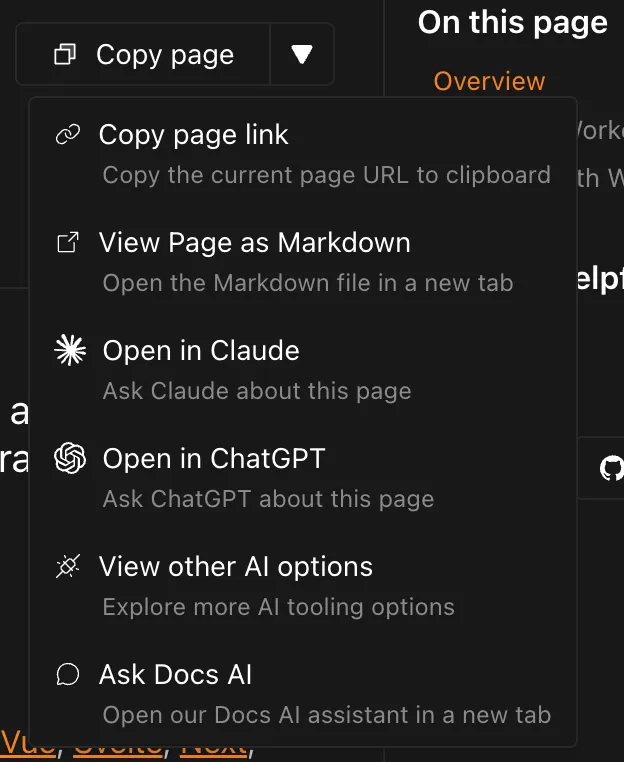
Much like markdown via cURL, the main work of this feature is making sure you have the markdown output to copy in the first place.
If you use Starlight ↗ as a docs framework, they now have a custom plugin ↗ to automatically add this functionality.
MCP server
Section titled “MCP server”An MCP server ↗ is a way of exposing certain tooling / functions to AI agents or interfaces. Think of it as a REST API, but for LLMs.
In an application context, that means an agent could create / update / delete something in another application easily.
In a docs context, your MCP server ↗ lets AI tools search your documentation directly instead of relying on generic web searches (or past training data). It’s another way in which developers are taking a lot of the actions normally performed on your docs site and moving that to a different context (IDE, terminal, chatbot).
MCP install links
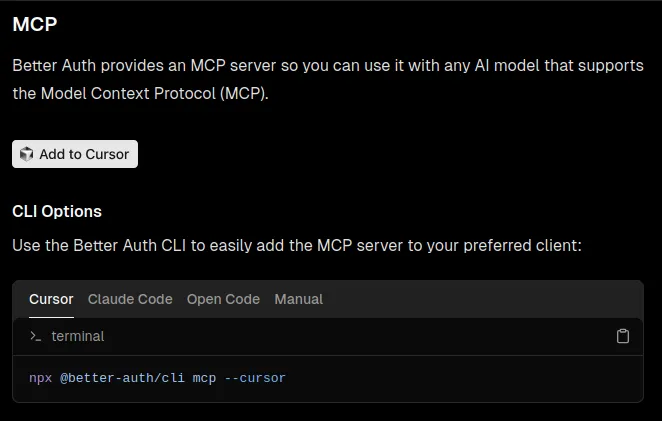
Section titled “MCP install links”If you already have an MCP server set up, you can provide developers direct install links for several flavors of IDEs and other tooling.
We have a subset of these in the Cloudflare docs ↗, though you can see other examples in the OpenAI docs ↗ or Better-Auth docs ↗.
Current gaps
Section titled “Current gaps”The biggest gap is the “fun” connundrum of I need this content available to everyone... just not AI crawlers.
The clearest illustration of this is in versioned content, like outdated Wrangler commands ↗:
- You want that content accessible to people, who might be running the old versions.
- You also want that content accessible for search crawlers, so people can find the content via Google or internal search.
- You don’t want that content accessible for ai crawlers.
Another flavor of this appears in certain best practices guides, where you intentionally want to document an anti-pattern (don't do this). Makes sense for humans (and search), but not for AI crawlers to pull into their training data.
There’s really no mechanism to flag a specific set of content as preferred over another.
Conclusion
Section titled “Conclusion”I very well might be missing things in this blog, whether they be current functionality or (very near) future standards.
Feel free to drop me a line at kody@kody-with-a-k.com if you have questions, thoughts, or ideas.